Products Services Industries Portfolio Technology Company Resources
LoginStart Free

NEW AI chat bot for your website · AI email replies

Free quotes & GST invoices, on autopilot with AI

The free quotation maker, GST invoice generator and simple CRM for freelancers and small businesses. Create a quote in 60 seconds by typing or speaking, capture every website lead with a form or chat bot, and follow up on time.

Quote in 60 seconds GST invoices AI website assistant AI email replies AI summaries Team chat APIs
Free plan forever 7-day Premium trial No card, no password

CappsAI Studio is a product of CappsAI Technology Private Limited, Chennai

Product tour

Take the CappsAI Studio tour

Thirteen real screens, one business day: from a website visitor to a paid invoice, with AI, email and My Studio along the way. Captured from the live product with a demo business.

studio.cappsai.com1 / 13
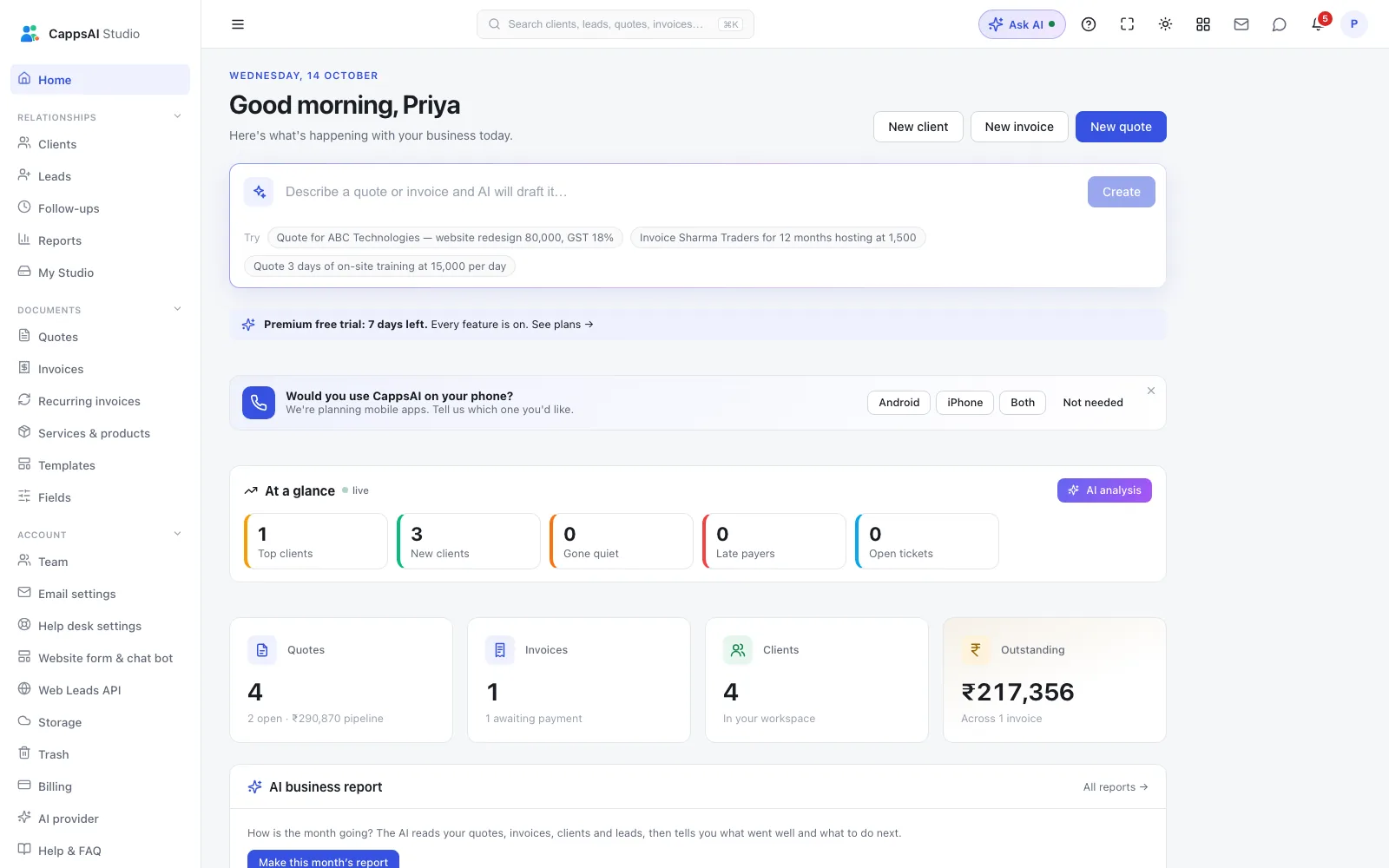
CappsAI Studio home screen
Home. Your day at a glance: quotes, invoices, money to collect, follow-ups due and the monthly AI business report.
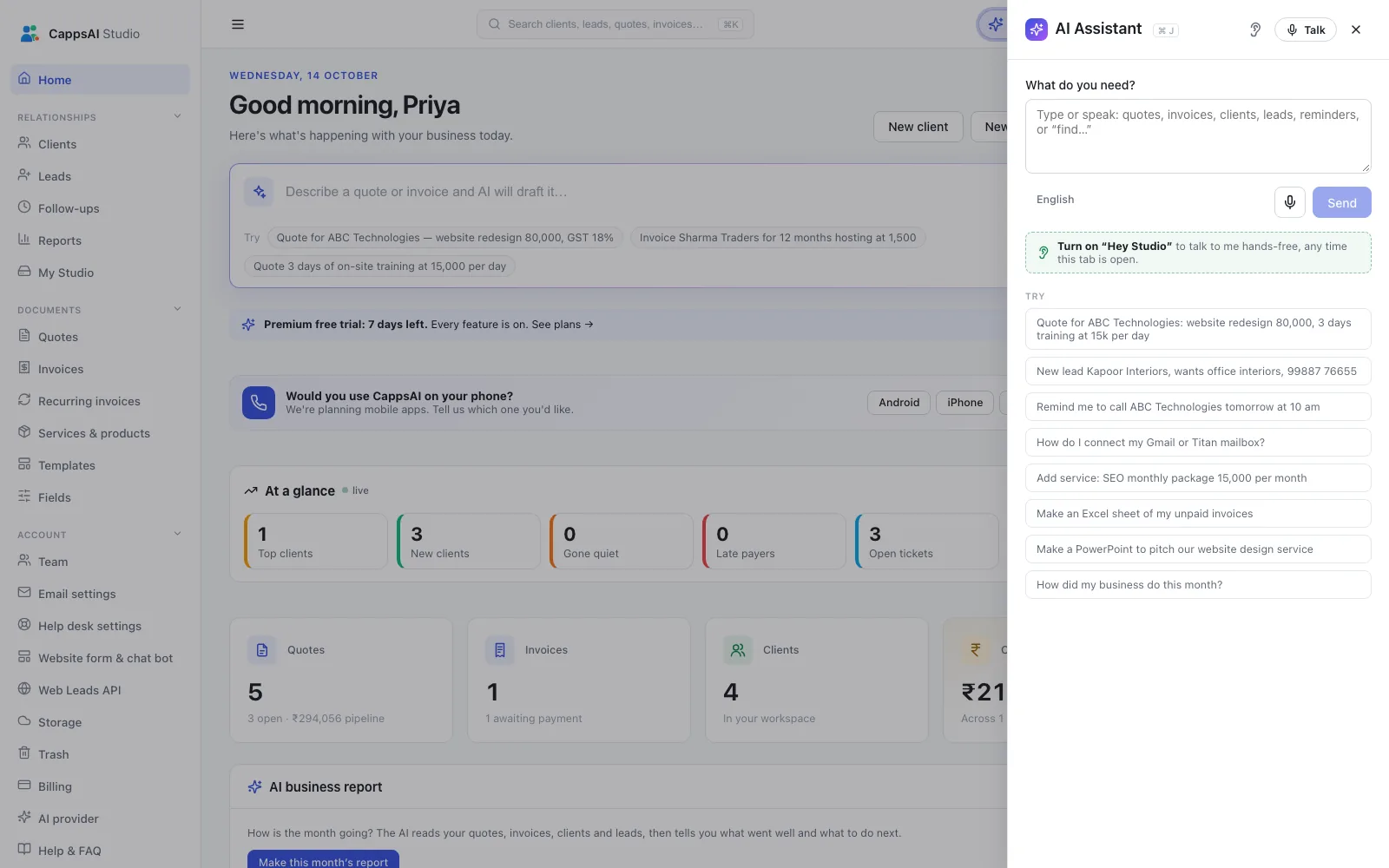
CappsAI Studio ai assistant screen
AI Assistant. Press Ctrl/⌘+J or say “Hey Studio” and type or speak: “Quote for ABC Technologies, website redesign 80,000”, “Remind me to call Ravi at 10”, “Make an Excel sheet of my unpaid invoices”. It prepares everything; you confirm.
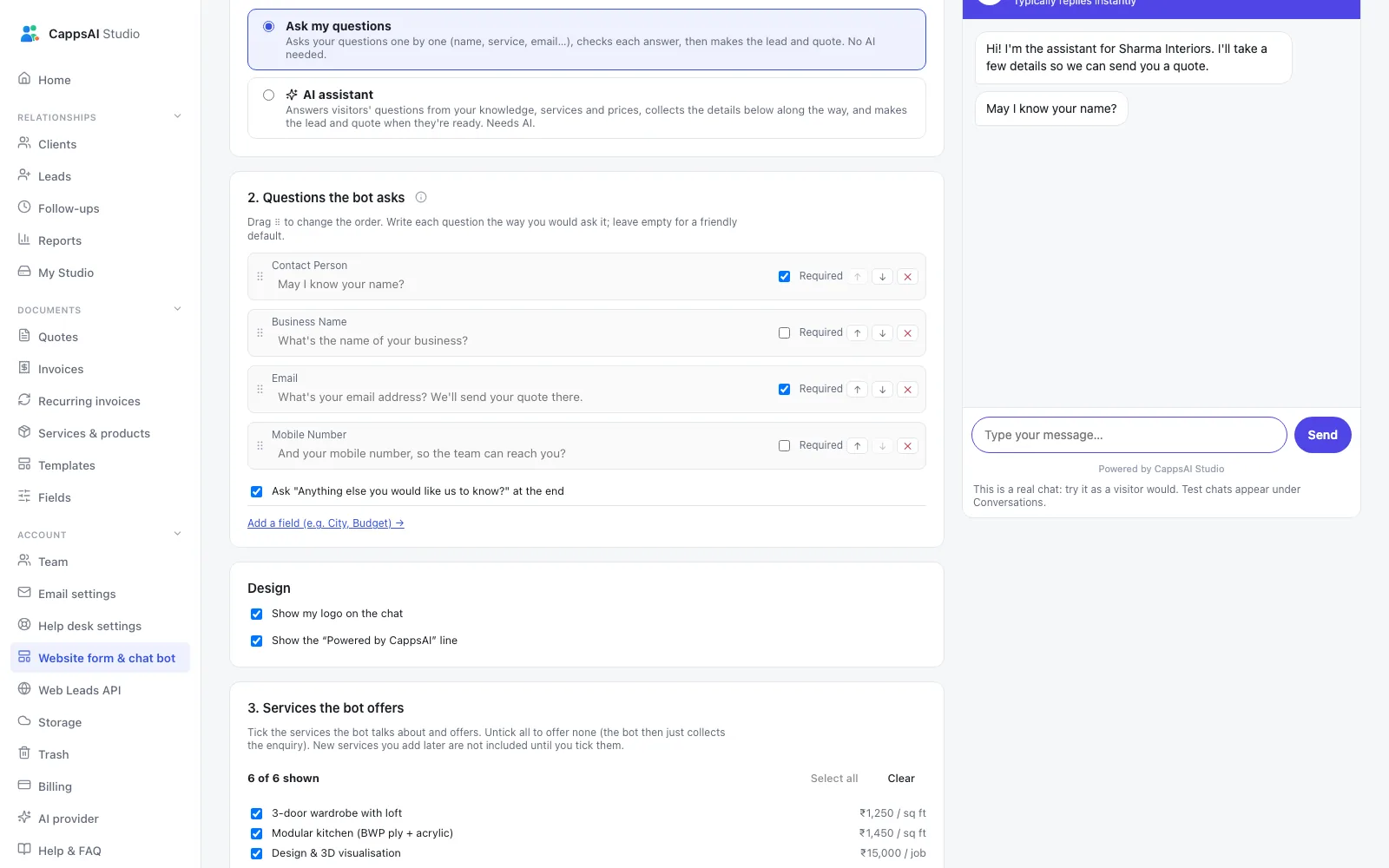
CappsAI Studio website chat bot screen
Website chat bot. Build the bot that sits on your website: your questions, your services and prices, AI answers from your knowledge, and a live preview. One line of code to install.
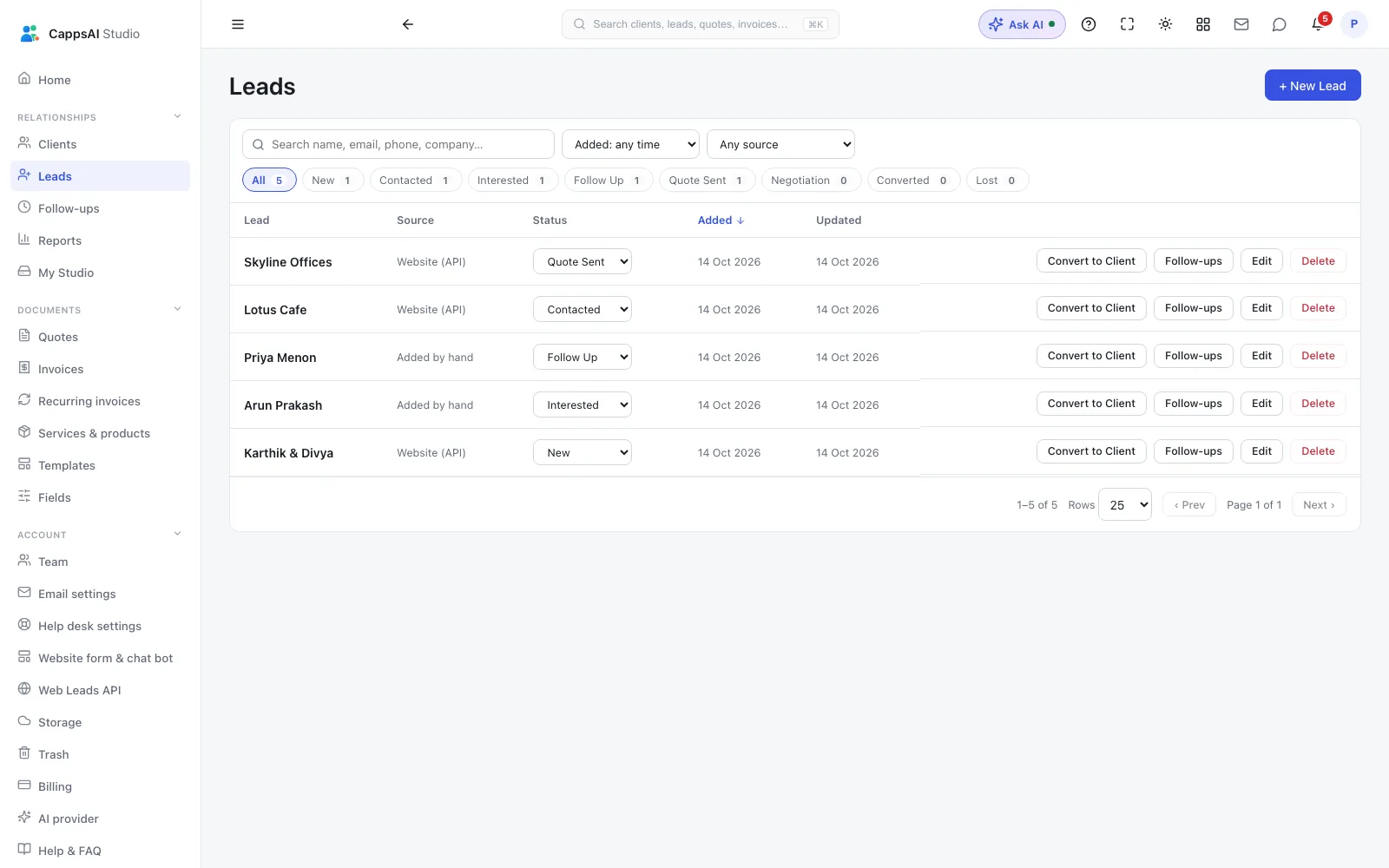
CappsAI Studio leads screen
Leads. Every enquiry from your website form, chat bot or Web Leads API lands here with its source and status. Convert a lead to a client in one click.
CappsAI Studio quote builder screen
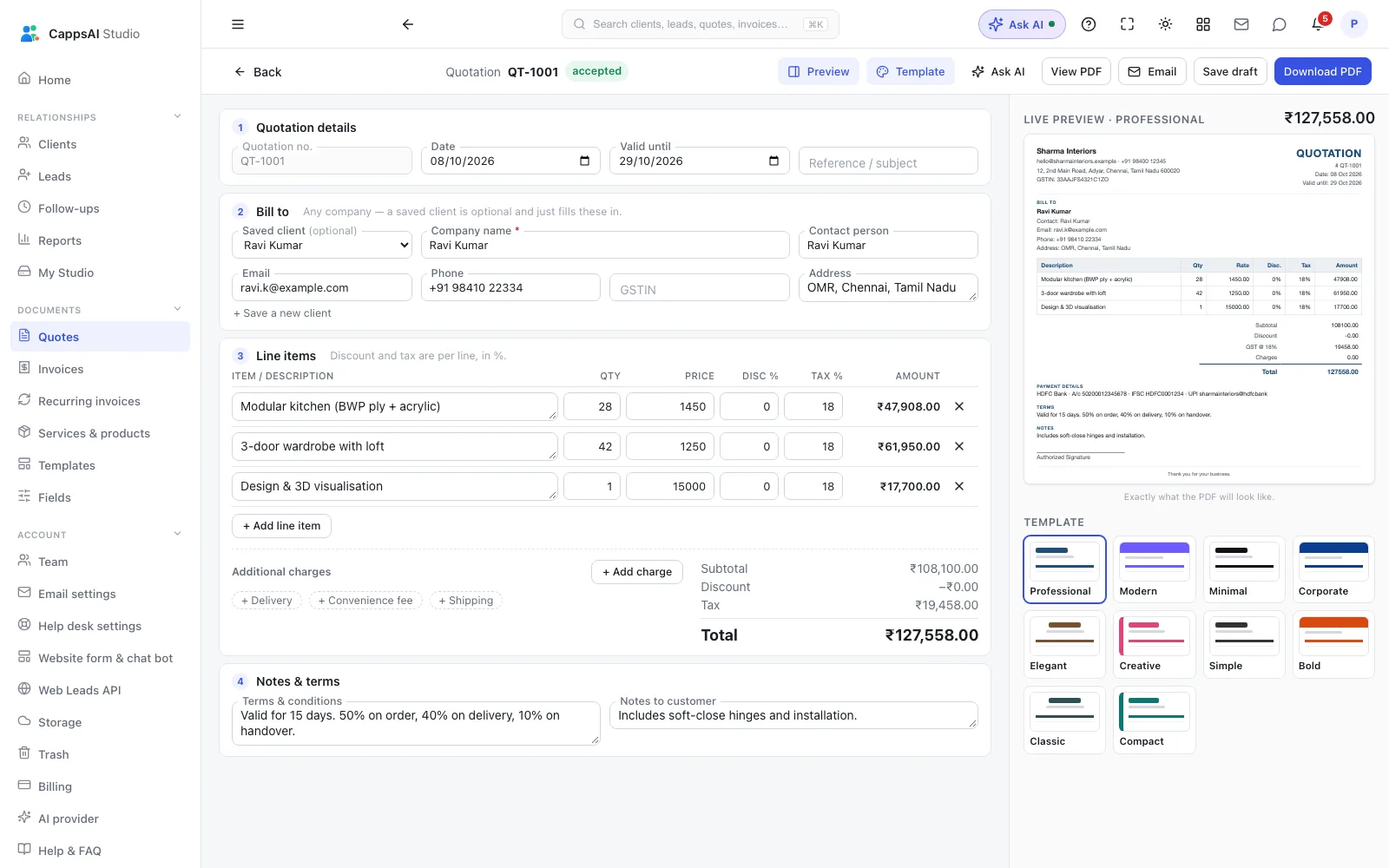
Quote builder. Pick saved services and the GST, HSN/SAC and price fill in. CGST/SGST or IGST is worked out from both states, with a live PDF preview and 10 templates.
CappsAI Studio follow-ups screen
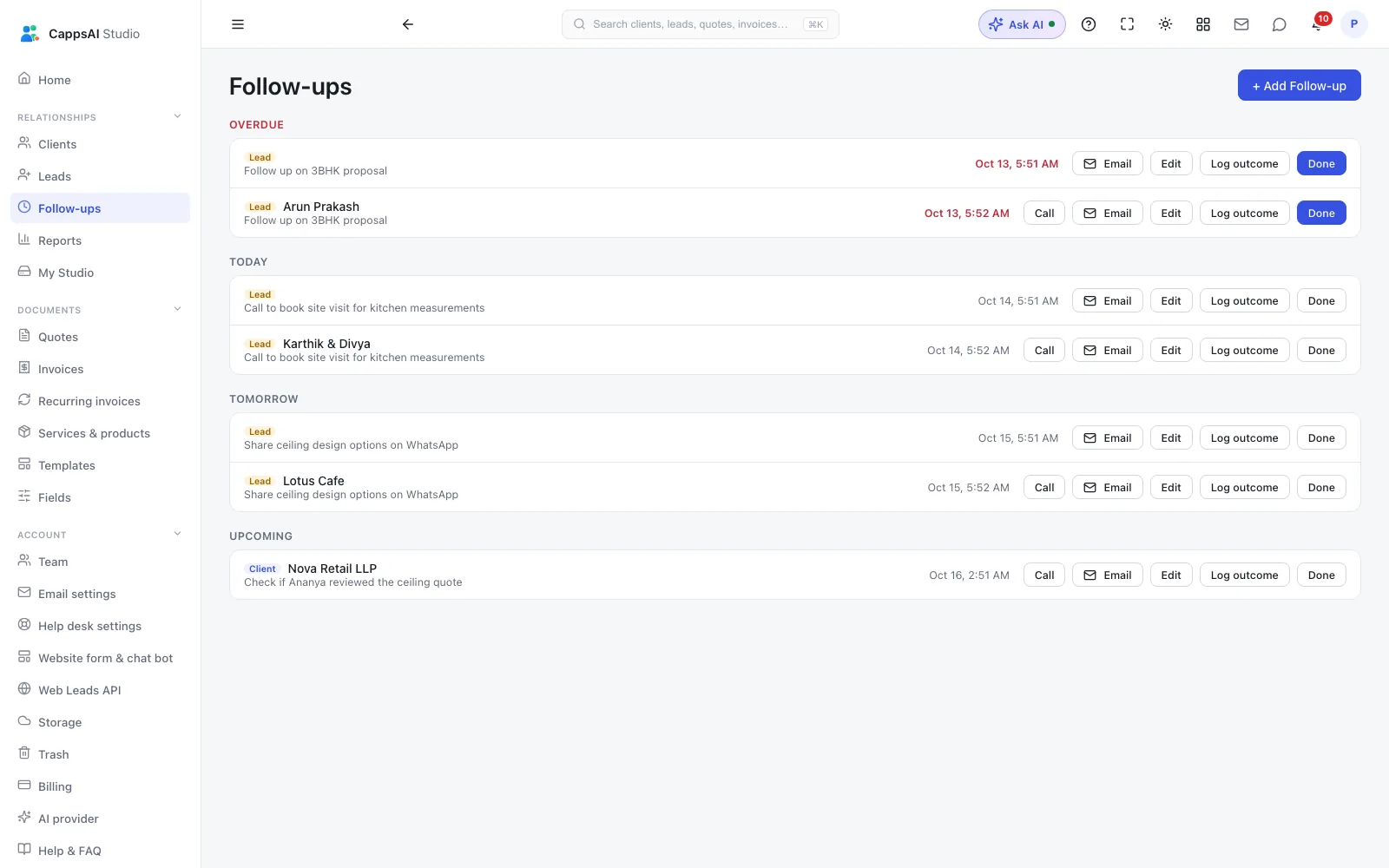
Follow-ups. Overdue, today, tomorrow and upcoming in one list. Call, email or log the outcome without leaving the page.
CappsAI Studio clients screen
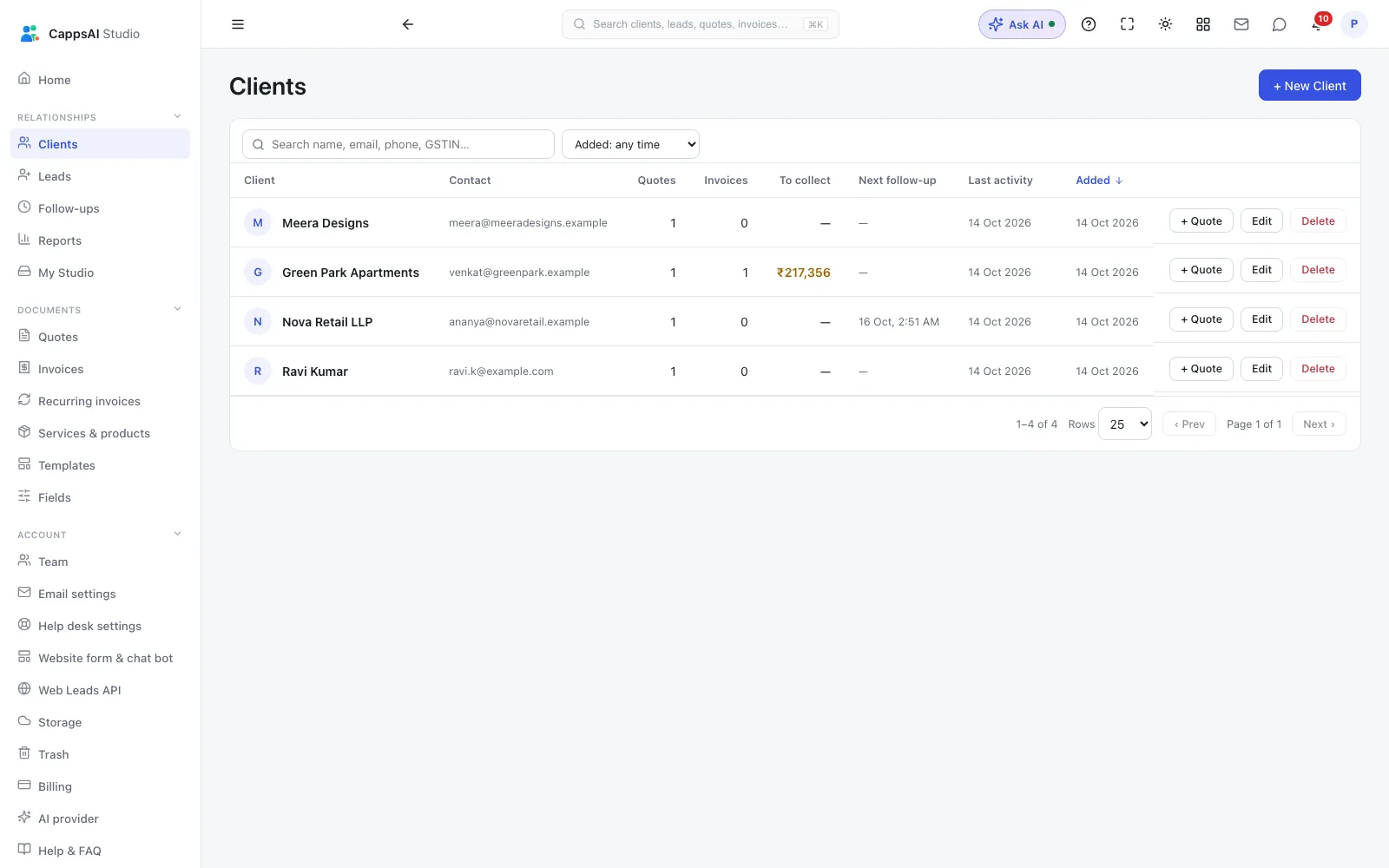
Clients. Every client with their quotes, invoices and money to collect, and a full history of emails, reminders and follow-ups.
CappsAI Studio email inbox screen
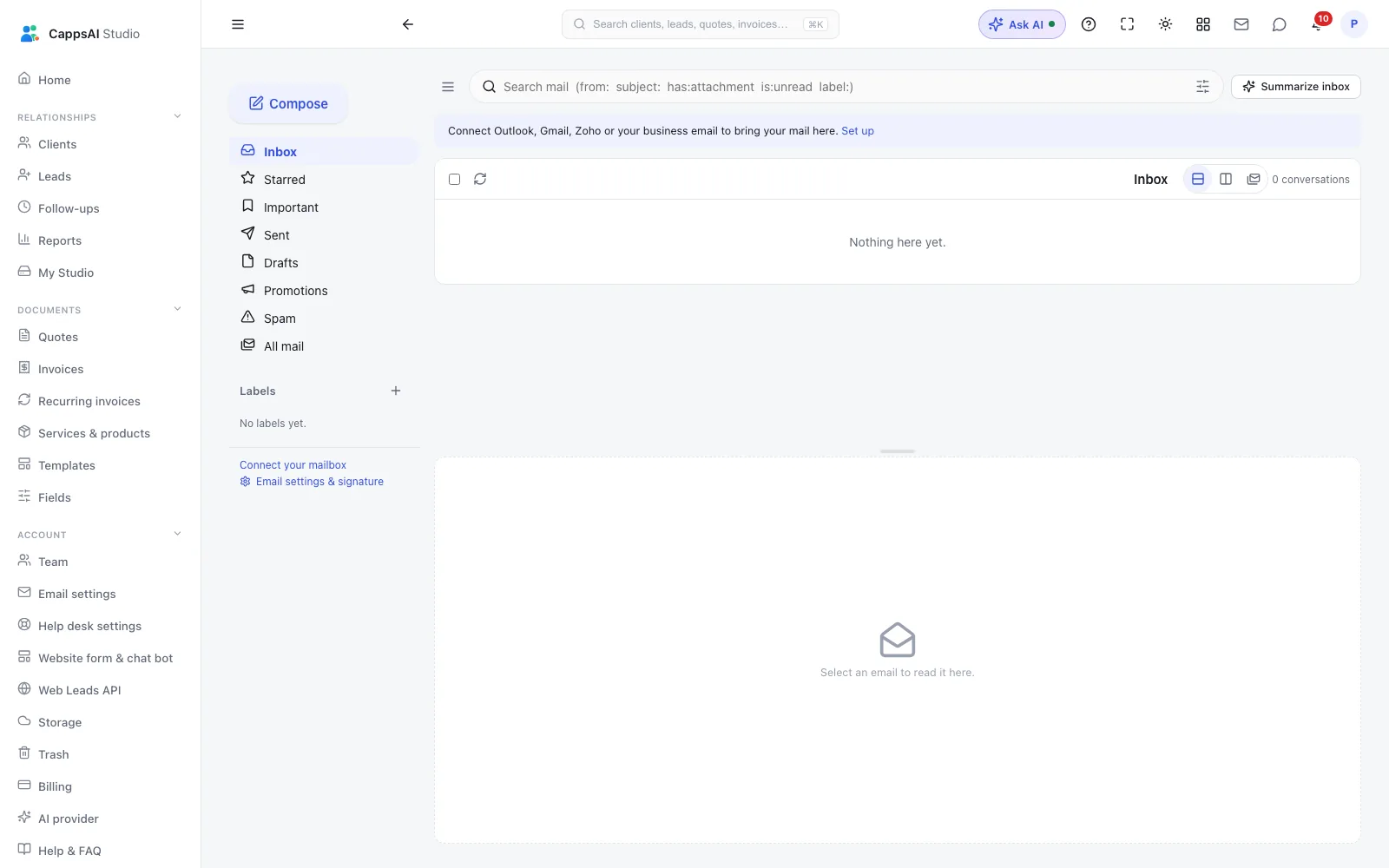
Email inbox. Connect Gmail, Outlook or Zoho once: customer mail lands here, linked to the client, with labels, Gmail-style search, AI summaries, AI-drafted replies and “Summarize inbox”. Premium.
CappsAI Studio my studio: sheets screen
My Studio: Sheets. Excel-style sheets with formulas and charts, built from your own business data. Opens and downloads .xlsx and .csv; the Analyse tab totals and groups your data.
CappsAI Studio my studio: docs screen
My Studio: Docs. Write proposals and letters with an AI writing partner, then download as Word or PDF or share a read-only link. Upload Word, Excel or PowerPoint files to edit them here.
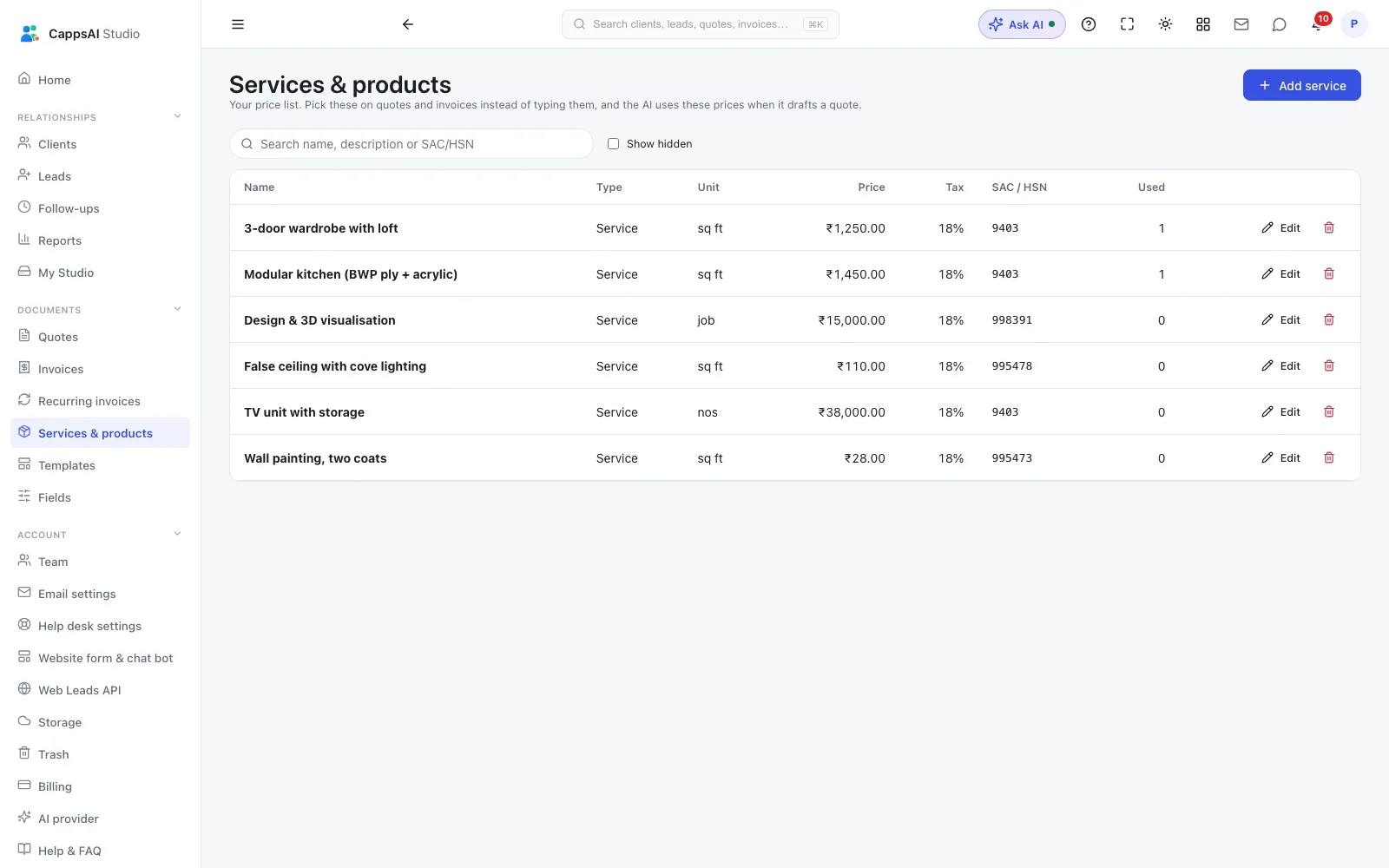
CappsAI Studio services & prices screen
Services & prices. Your price list with units, GST % and SAC/HSN codes. It powers quotes, AI drafts, the website form and the chat bot.
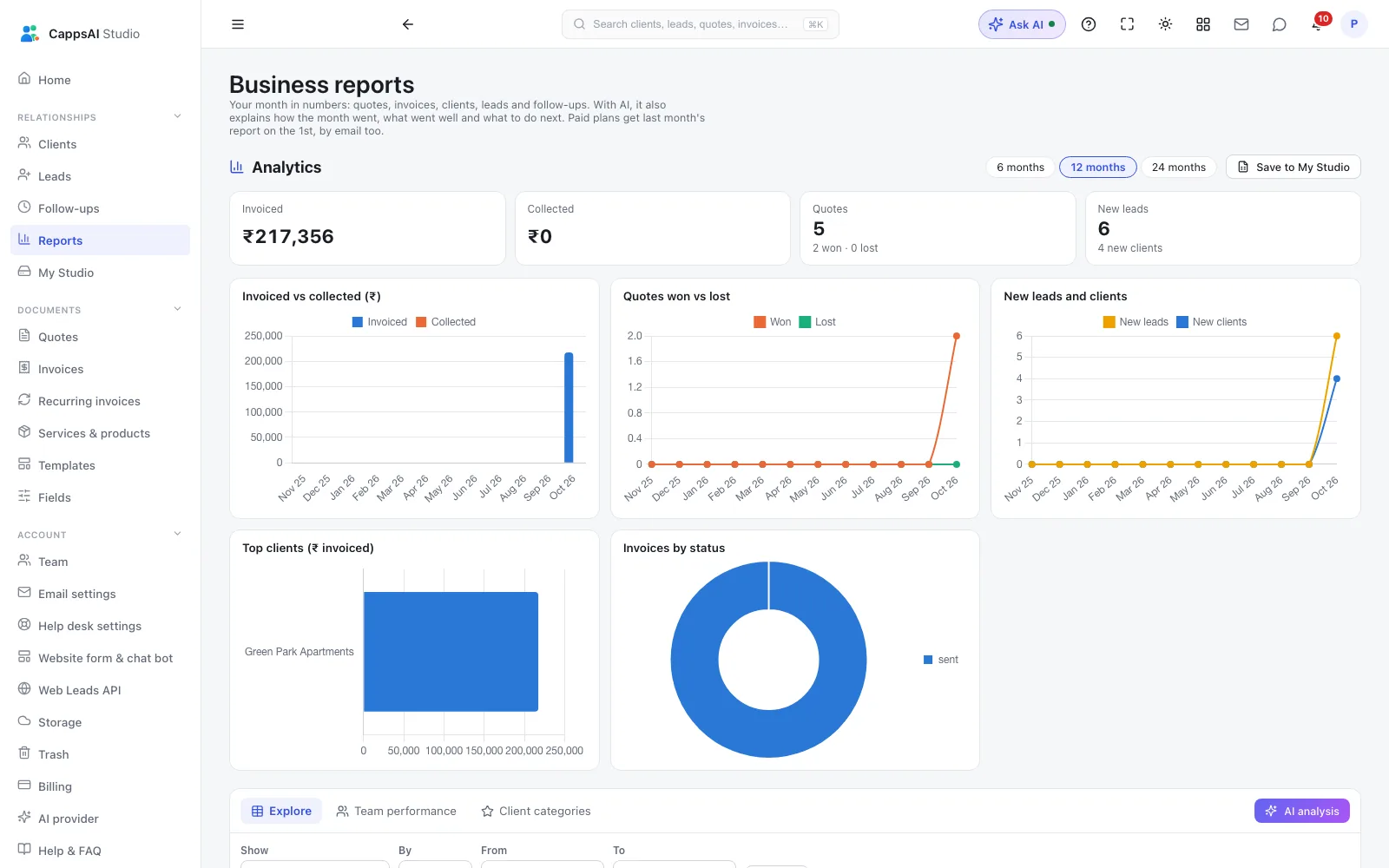
CappsAI Studio reports screen
Reports. Invoiced vs collected, quotes won and lost, new leads and top clients over 6, 12 or 24 months. Save any chart to My Studio as a sheet.
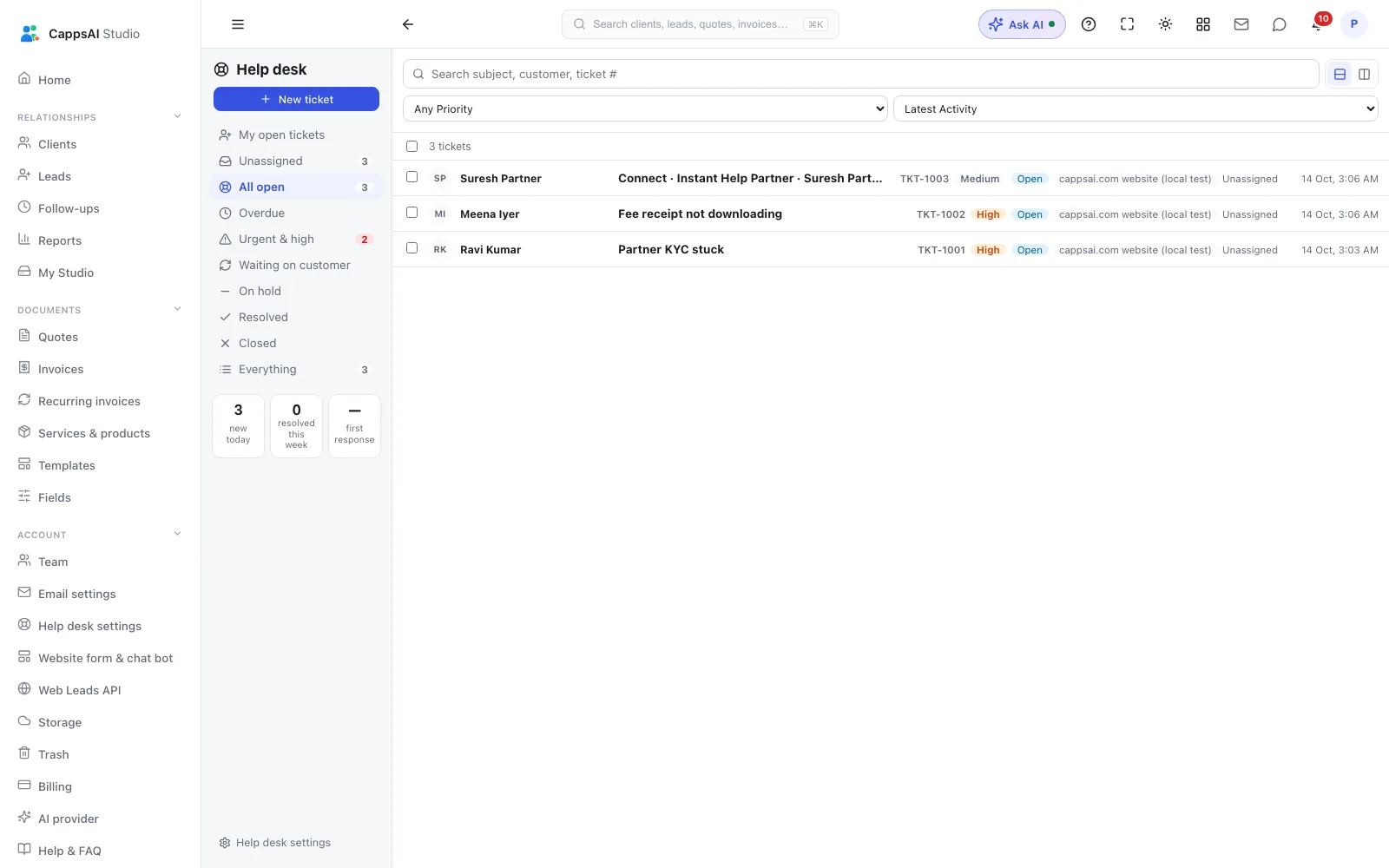
CappsAI Studio help desk screen
Help desk. Customer tickets from your support mailbox, the Tickets API or your website, with priorities, response targets, canned replies and AI-drafted answers.

Try it free Book a live demo

See it in action

From website chat to paid invoice, on autopilot

Watch one enquiry travel through CappsAI Studio. Tap any step.

studio.cappsai.com

Modular kitchens & wardrobes, made to fit

Studio assistantOnline · replies instantly
Hi! Ask me anything about our work.
Price for a 10 ft modular kitchen?
From ₹1,450/sq ft installed. Shall I send a quote? What's your email?
Ravi · ravi@example.com
LeadsToday
R
Ravi · Modular kitchenWebsite chat · /kitchens · mobile
New
P
Priya · WardrobeWebsite form · Google Ads
Follow-up 4 pm
K
Kumar Traders · Office fit-outWeb Leads API
Quoted
M
Meera Designs · Logo kitAdded by voice
Client
New lead from chatRavi · assigned to Anita
New quotationQT-1031
Modular kitchen · 28 sq ft × ₹1,450₹40,600.00
CGST 9% · Tamil Nadu₹3,654.00
SGST 9% · Tamil Nadu₹3,654.00
Total₹47,908
Totals calculated by the app, never by AI · Draft waits for your OK
Share QT-1031PDF · link · email
Ravi
Quotation QT-1031.pdf
Hi Ravi, here's your kitchen quote. View online: studio.cappsai.com/q/…✓✓ 10:42
Looks good, let's go ahead 👍
SentWhatsApp · 10:42
ViewedOpened on mobile · 10:47
AcceptedConverted to INV-1007
Follow-up setPayment reminder in 7 days
This monthReports
Revenue₹3,84,500
Quotes won23
To collect₹62,300
INV-1007 paid₹47,908 · UPI
K
Karthik · Accounts

@Anita Ravi's kitchen invoice is paid ✅

Inside the app

Real screens from CappsAI Studio

Captured from the live product with a demo business, Sharma Interiors. No mock-ups.

Website chat bot asking which services the visitor needs, with prices
The chat bot shows your services and prices
Website chat bot confirming the enquiry and emailing a quote
…and turns the chat into a lead with a quote on its way

The chat bot on this website is CappsAI Studio

Tap Chat with CappsAI in the corner of this page. It's the same bot you can add to your own website with one line of code, and every conversation lands in Studio as a lead.

How the assistant works
AI Assistant

Ask Studio. It does the work, you approve it.

Click Ask AI, press Ctrl/⌘ + J or just say “Hey Studio”, then type or speak in plain words. The assistant prepares the quote, client, reminder or document and shows it to you first. It never saves on its own, and it never calculates money: totals come from the app.

  • Create: quotes, invoices, clients, leads, follow-ups and services from one sentence.
  • Ask your numbers: “How much is unpaid this month?”, “Which invoices are overdue?” It answers from your own data and never guesses figures.
  • Make documents from your data: “Make an Excel sheet of my unpaid invoices”, “Make a pitch deck for website design”.
  • Get help: “How do I connect my Gmail?”, explain an error, or raise a support ticket for you.
  • Everywhere in the app: fill a client from a visiting card, summarise and draft emails, write in Docs, analyse Sheets and reports, answer help desk tickets, and run your website chat bot.
  • Your choice of AI: an AI pack on any plan, or your own OpenAI, Claude or Gemini key. New accounts get Premium with AI free for 7 days.
CappsAI Studio AI Assistant panel with example requests
The AI Assistant panel, with ideas to try.
My Studio · included on every plan

Your own office suite, powered by your business data

Docs, Sheets, Slides and a PDF editor inside CappsAI Studio, with AI built in. Turn your quotes, invoices and reports into spreadsheets and documents in seconds, and keep every file in one place.

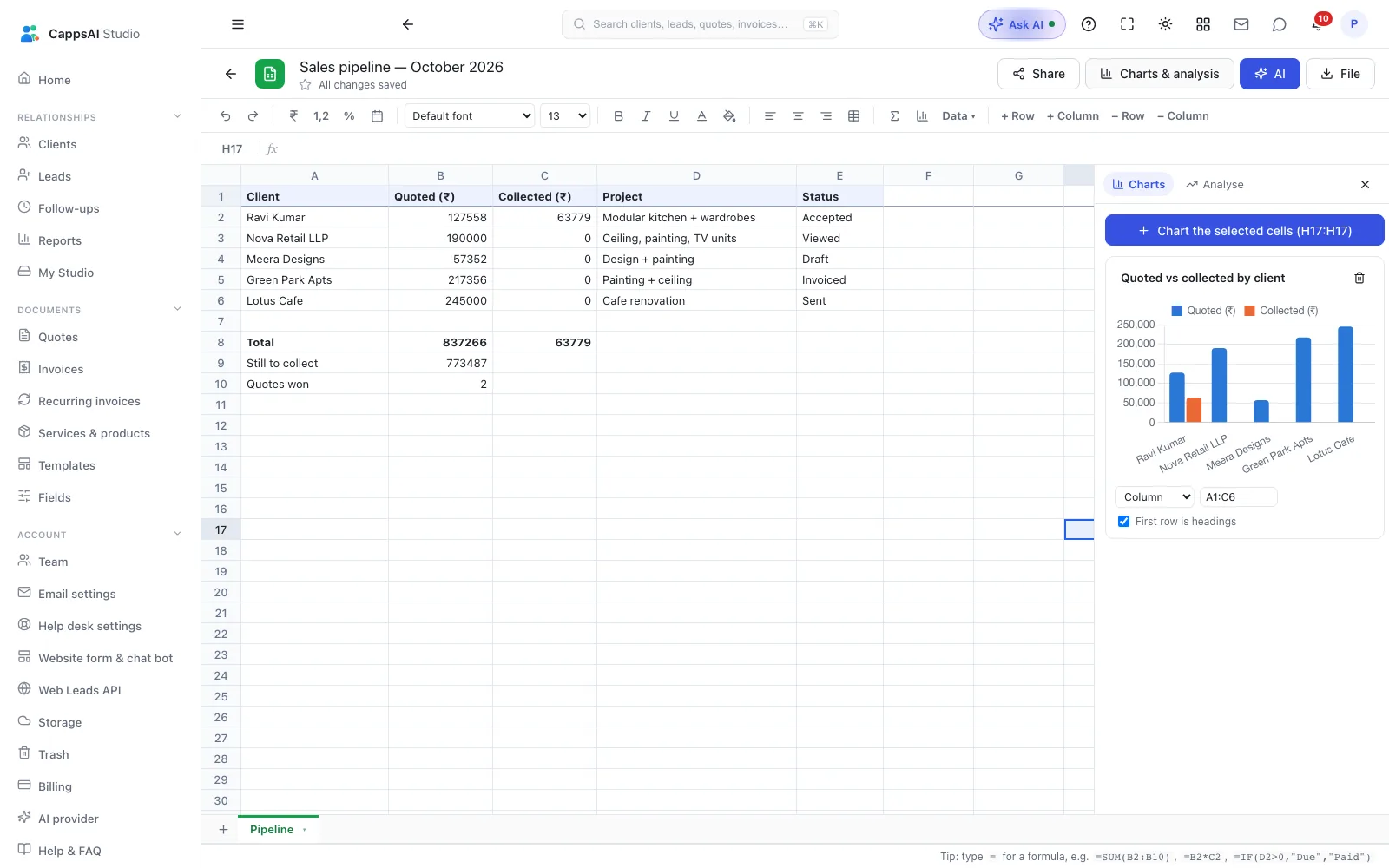
CappsAI Studio Sheets with a sales pipeline, formulas and a column chart
Sheets. Formulas (SUM, IF, SUMIF, COUNTIF and more), bar, column, line, pie and scatter charts, and an Analyse tab. Opens and downloads Excel and CSV.
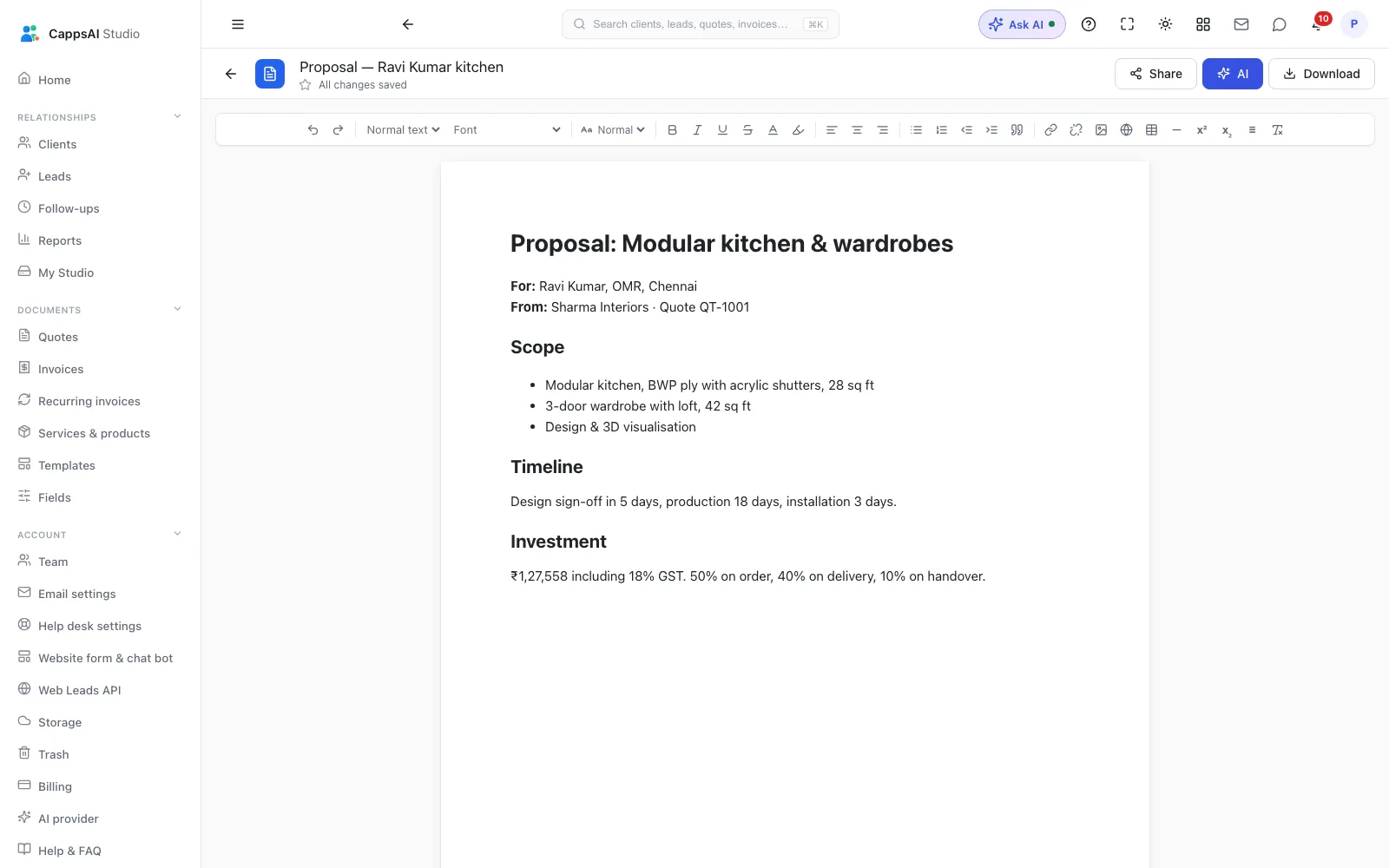
CappsAI Studio Docs editor with a client proposal
Docs. Proposals, letters and policies with an AI writing partner. Download as Word or PDF.
Built from your data“Make a sheet of this month's sales” or save any report chart to My Studio as a spreadsheet.
AI that writes as youPick who it writes as: owner, sales, marketing, accountant, HR, support or trainer. Write, shorten, translate, build formulas, or generate a whole deck with speaker notes.
Word, Excel, PowerPoint, PDFUpload .docx, .xlsx, .csv or .pptx to edit, and download back in the same format. PDFs open in the PDF editor: add text, highlight, sign, rotate.
Stored safely, shared simplyFolders, stars, Trash and storage from 1 GB (Free) to 500 GB (Premium). Share a read-only link and stop it any time. Save email attachments straight in.
Built for your size

From a one-person business to a growing team

Start alone on the free plan. Add your team, email and a help desk only when you need them. You never pay for software you don't use.

Freelancers & one-person businesses

Free forever, no card

Send a professional quote from your phone between meetings, without spreadsheets or Word templates.

  • ₹0 Free plan for up to 100 clients
  • GST quotes, invoices and recurring invoices
  • Website enquiry form and lead tracking
  • Sign in with Google, Apple or an email code
  • Docs, Sheets, Slides and PDF editor included
Small businesses

Pro at ₹99 a month

For shops, studios and service businesses with a small team that shares clients and quotes.

  • Up to 1,000 clients and 5 GB storage
  • Up to 5 people with roles and team chat
  • Custom quote and invoice templates
  • Analytics dashboards and live alerts
Medium businesses

Premium at ₹299 a month

For teams that run sales, billing, email and customer support from one place.

  • Unlimited clients and team members, 500 GB
  • Email customers from your own address
  • Customer help desk with AI answers
  • Web Leads API and no CappsAI branding
Everything in one workspace

Quotes, leads and follow-ups, connected

Most small businesses lose deals in the gaps between a quote tool, a spreadsheet of leads and a reminder app. CappsAI Studio keeps them together.

Free online quotation maker & GST invoice generator

Make a professional quotation or estimate in minutes and convert it into a GST tax invoice in one click. CGST + SGST or IGST and the place of supply are worked out from both states.

  • Pick a saved service: price, GST rate and HSN/SAC fill in
  • Per-line discount and tax, extra charges, custom columns
  • Your own number prefixes (QT / INV) and payment terms
  • Convert an accepted quote to an invoice in one click
  • Recurring invoices for retainers and AMCs
  • Exact decimal maths: the AI never calculates money

AI by text or voice

Say "remind me to call Meera tomorrow 11am" or "quote for Kumar Traders, 20 chairs at ₹5,000". You get a draft to confirm; nothing saves on its own.

Website form, AI chat bot & lead control

Add an enquiry form or a chat bubble to your website with one line of code. Each enquiry becomes a lead with a ready quote, emailed back in seconds, plus source tracking and spam protection.

  • Drag-and-drop form designer with your colours and fonts
  • Assign leads, add notes, convert to client in one click

A free CRM that stays simple

Clients with your own custom fields, a full history of every quote, invoice, email and follow-up, and how much each client owes you.

  • Paste a visiting card or WhatsApp message to fill the form
  • One-tap WhatsApp to any client

Follow-ups that happen

Today, Upcoming and Overdue views with a notification when each follow-up is due. Reschedule or hand one to a colleague.

Share anywhere

Download the PDF, or send a link your customer opens without signing in, with a ready-made WhatsApp or email message. See when it's viewed.

Reports & AI insights

A monthly AI business report on sales, quotes won and lost, unpaid invoices and best clients. Dashboards on Pro and Premium.

My Studio office suite

Docs, Sheets, Slides and a PDF editor with an AI writing partner. Open and export Word, Excel and PowerPoint. On every plan.

Team & roles Pro+

Admin, Manager, Sales, Accounts, Support and Viewer roles, 13 permission areas, team chat and an activity log.

Email & inbox Premium

Email quotes, invoices and payment reminders with the PDF attached, from your own address. Connect Gmail, Outlook or Zoho and get AI summaries, drafted replies and Smart Compose.

Customer help desk Premium

Numbered tickets, response targets, canned replies and automations. An AI knowledge base can suggest or send answers from your own articles and price list.

AI website assistant

An assistant on your website that talks to customers for you

Add a chat bubble to your website with one line of code. It answers visitors' questions from your own knowledge and price list, collects their details and turns the chat into a lead with a quote, day or night.

  • Answers from your knowledge. Type it in, upload Excel, CSV or Word files, or point it at your website and it reads the pages.
  • Knows your services and prices, so visitors get real answers, not "someone will call you".
  • Turns chats into leads. Name, email and phone are collected along the way, and a draft quote can be emailed in seconds.
  • Every chat is saved on the lead, so you or your team can pick up the conversation and contact the customer.
  • Your greeting, your style: set the welcome message, launcher text, position and extra instructions for the AI.
  • Two modes: an AI assistant (with an AI pack, the trial or your own AI key) or a guided question flow that's included free on every plan.
Sharma Interiors Assistant · replies instantly
Hi! I'm the assistant for Sharma Interiors. Ask me anything about what we do.
How much for a modular kitchen, 10 ft?
Our modular kitchens start at ₹1,450 per sq ft including installation. A 10 ft straight kitchen is usually 25–30 sq ft. Shall I prepare a quote for you?
Yes please
Great. What's your name and email? I'll send the quote there.
Ravi, ravi@example.com
Lead created · quote emailed to Ravi
Type a message…
Work together, connect anything

Internal team chat and developer APIs, built in

Talk to your team next to the quotes and clients you're discussing, and plug Studio into your own website, app or tools.

Internal team chat Pro & Premium

A company-wide General channel, direct messages and groups. Messages arrive instantly, @mentions notify people, and you can link straight to a client, lead, quote, invoice or document.

  • Roles: Admin, Manager, Sales, Accounts, Support, Viewer
  • Assign leads and follow-ups with a notification
  • Activity log of who did what

Developer APIs Premium

Send leads from any website, app or tool with the Web Leads API. Any fields are accepted and mapped to your lead fields; the source page, UTM tags and device are recorded.

# Send a lead to CappsAI Studio
curl -X POST https://studio-api.cappsai.com/api/v1/lead-capture \
  -H "X-Api-Key: YOUR_LEAD_CAPTURE_KEY" \
  -H "Content-Type: application/json" \
  -d '{"name":"Ravi","email":"ravi@example.com",
       "phone":"+91 98xxxxxx10","message":"Modular kitchen"}'
  • Keys can be limited to your own website addresses
  • Your price list available for your own forms
  • Tickets API: create help-desk tickets and read replies from your app
  • Built-in developer guide with examples
Developers · Premium

APIs for leads, services and support tickets

Connect your website, app or tools to CappsAI Studio. Every request is JSON over HTTPS with your key in the X-Api-Key header.

Website lead key

For the Web Leads API and the Services API.

  1. In Studio open Account menu → Web Leads API.
  2. Give the key a name, e.g. “Company website”.
  3. Under Allowed websites add your site exactly, e.g. https://www.mysite.com. Leave it empty for server-to-server use only.
  4. Click Create and copy the key straight away: it's shown only once.

A key with websites only works from a browser on those sites, so it's safe in your page code. Revoke or rename it any time.

Open Web Leads API in Studio

Help desk (Tickets) key

For the Tickets API, from your app's server.

  1. In Studio open Help desk settings → Your apps (API).
  2. Add your app (one key per app) and copy its key.
  3. Keep it on your server: it is never put in website or app code.

Tickets created this way show the app's name in the help desk, and the customer gets the acknowledgement email.

Open Help desk settings in Studio

POST https://studio-api.cappsai.com/api/v1/lead-capture: send any fields as JSON or a form. Fields that match your lead fields fill them in (name, company, full_name, email, phone/mobile/whatsapp, service/requirement…); everything else is kept on the lead. UTM tags, page, referrer and device are recorded. Plain HTML forms can use ?key=… or a hidden _key field, and a hidden _hp spam trap.

curl -X POST https://studio-api.cappsai.com/api/v1/lead-capture \
  -H "X-Api-Key: YOUR_WEBSITE_LEAD_KEY" -H "Content-Type: application/json" \
  -d '{"name":"Mehta Retail","full_name":"Anil Mehta","email":"anil@mehta.in",
       "mobile":"+91 98765 43210","services":["Website design"],
       "budget":"50k - 1L","utm_source":"google"}'

# 201 → {"success": true, "lead_id": "…", "mapped_fields": {…}, "unmapped_fields": ["budget"]}

GET https://studio-api.cappsai.com/api/v1/lead-capture/services with the same website key returns your Studio price list, so your own form can show your services and prices. Send the chosen ones back with the lead as services (ids or names); they appear under “Interested in” and turn into a quote in one click.

curl https://studio-api.cappsai.com/api/v1/lead-capture/services \
  -H "X-Api-Key: YOUR_WEBSITE_LEAD_KEY"

# → {"success": true, "services": [
#      {"id": "…", "name": "Website design", "rate": 25000,
#       "unit": null, "tax_percent": 18, "hsn_sac": "998314"} ]}
# Show them on your form, then send the chosen ids or names as "services".

POST https://studio-api.cappsai.com/api/v1/helpdesk-api/tickets from your server. email is required so your team can reply; also subject, message, name, phone, priority (low · medium · high · urgent), category, tags, external_ref and meta.

curl -X POST https://studio-api.cappsai.com/api/v1/helpdesk-api/tickets \
  -H "X-Api-Key: YOUR_HELPDESK_KEY" -H "Content-Type: application/json" \
  -d '{"email":"customer@example.com","name":"Ravi Kumar",
       "subject":"Can'\''t log in","message":"The app says my password is wrong.",
       "priority":"high","external_ref":"user-1234",
       "meta":{"app_version":"2.3.1","device":"Android 14"}}'

# 201 → {"ticket": "TKT-1001", "status": "open"}  (show the number to your customer)
# GET  /tickets/1001?email=…           → status and the replies your team sent
# POST /tickets/1001/messages          → the customer adds to the ticket
Statuserror.codeMeaning
400invalid_json · empty_submission · too_many_fieldsBody isn't a JSON object, has no fields, or has more than 100 fields
401missing_key · invalid_keyNo key, or the key is wrong or revoked
403wrong_key_type · origin_not_allowed · browser_not_allowedWrong kind of key, website not allowed, or a server-only key used in a browser
413 · 415payload_too_large · unsupported_content_typeBody over 64 KB, or not JSON/form data
429rate_limitedToo many submissions: wait for Retry-After

Web Leads: 10 submissions a minute per visitor and 300 an hour per key; up to 100 fields and 5,000 characters per value. Every response is JSON with success; HTML form posts get a thank-you page or your _redirect.

Full guides with examples (JavaScript, HTML form, cURL, PHP) are inside Studio under Web Leads API and Help desk settings. Questions? See the Help Center or raise a ticket.

Made for

Quotation software for every kind of small business

If you send quotes and chase payments, CappsAI Studio is built for you.

Interior designers Contractors & builders Digital agencies IT & software services Consultants Freelancers Event planners Repair & AMC services Wholesalers & traders Coaching & training Photographers Manufacturers
Why businesses switch

Stop juggling Excel, Word and five other apps

Instead of Excel and Word

Quotes and invoices with your logo, numbered automatically, with GST calculated for you.

Instead of separate tools

Quotes, invoices, CRM, email, website leads, help desk and documents share one login and one client list.

Instead of typing everything

AI drafts quotes, replies and summaries from a sentence. You check and send.

How it works

From enquiry to paid invoice in four steps

Tell it what you need. AI understands it. You review it. Send it.

Capture the lead

An enquiry arrives through your website form, or you add it by typing a sentence. You're notified straight away.

Draft the quote

Type or speak the request. AI builds the draft from your saved prices; the app calculates GST and totals exactly.

Send & follow up

Share the PDF or link on WhatsApp or email, see when it's viewed, and set a follow-up reminder.

Invoice & collect

Convert the accepted quote to an invoice, record payments as they come in, and track the balance due.

Lead Client Quote sent Viewed Accepted Invoice Paid
Affordable pricing

Start free. Upgrade from just ₹99 a month.

Prices in Indian rupees, plus 18% GST. Every new account gets Premium free for 7 days, with AI included.

Free

For freelancers and one-person businesses

₹0

Free forever

  • 100 clients, 1 GB storage
  • GST quotes, invoices, recurring invoices
  • Leads, follow-ups & reminders
  • Website enquiry form
  • Share links & custom fields
  • Docs, Sheets, Slides, PDF editor
  • Use your own AI key
Start free
BEST FOR SMALL TEAMS

Pro

For small businesses with up to 5 people

₹99/month

₹116.82 incl. GST

  • Everything in Free
  • 1,000 clients, 5 GB storage
  • Up to 5 people, roles & team chat
  • Custom templates
  • Analytics dashboards & real-time alerts
  • Support tickets
  • First 30 days with every Premium feature
Choose Pro

Premium

For growing and medium businesses

₹299/month

₹352.82 incl. GST

  • Everything in Pro
  • Unlimited clients & team, 500 GB
  • Email customers from your own address
  • Mailbox inside Studio with AI replies
  • Customer help desk
  • Web Leads API, no CappsAI branding
  • 24×7 priority support
Choose Premium

Enterprise

For custom limits, deployment or development

Custom


  • Everything in Premium
  • Custom storage and AI limits
  • Custom development & deployment
  • Dedicated manager
Book a demo
AI Starter pack: ₹200/monthFor drafts, records, reminders, email and documents. Or bring your own OpenAI, Claude or Gemini key on any plan and pay nothing to CappsAI for AI.
Storage packs from ₹49/month+10 GB ₹49, +50 GB ₹149, +100 GB ₹249 a month, shared by your whole company.
Extra team members₹99 a person a month on Pro, ₹299 on Premium, billed separately from the date they join.

Pay by UPI Autopay, debit or credit card, or net banking through Razorpay. Cancel any time from Billing; your data stays and the account moves to Free.

CappsAI Studio plan comparison
FeatureFreeProPremiumEnterprise
Clients1001,000UnlimitedUnlimited
Storage1 GB5 GB500 GBCustom
GST quotes, invoices, recurring invoices✓✓✓✓
Leads, follow-ups, website form✓✓✓✓
Docs, Sheets, Slides, PDF editor✓✓✓✓
Analytics dashboards & custom templates–✓✓✓
Team members–Up to 5UnlimitedUnlimited
Email customers & inbox––✓✓
Help desk, Web Leads API––✓✓
No "Created with CappsAI" branding––✓✓
SupportHelp centreTickets24×7 priorityDedicated manager
Getting started guide

Up and running in minutes

A quick walkthrough of the first things to do after you sign up.

Sign up & add your business details

  1. Open studio.cappsai.com and sign in with Google, Apple or a 6-digit email code. The first sign-in creates your account.
  2. In Settings, add your business name, address, GSTIN, logo and contact details.
  3. Enter your bank and UPI details once; they appear on every invoice.
  4. Set your number prefixes (for example QT and INV) and default payment terms.

Add your services and products

  1. Add each service with a name, unit, rate, GST % and SAC/HSN code.
  2. Your most-used items appear first in the quote builder.

Your price list powers AI drafts, the website form and help-desk answers, so it's worth doing first.

Create your first quotation

  1. Type in the AI box on Home, for example quote for Meera, 3 logo designs at ₹5,000, or open the quote builder.
  2. Review the draft, adjust lines, discounts or extra charges, and choose a template.
  3. Confirm and save, then share by WhatsApp, email, link or PDF.

Add the enquiry form to your website

  1. Open Website form and arrange the fields, colours and font to match your site.
  2. Choose which of your services visitors can pick, with or without prices.
  3. Copy the one-line code (or iframe) into your website.
  4. Optionally turn on an automatic reply with a draft quote for each enquiry.

Follow up and send the invoice

  1. Add a follow-up on the lead or client, or say "remind me to call Meera tomorrow 11am".
  2. When the quote is accepted, convert it to an invoice in one click.
  3. Record payments as they arrive; the invoice moves to partially paid or paid by itself.

Invite your team Pro & Premium

  1. On the Team page, add a person and choose a role: Admin, Manager, Sales, Accounts, Support or Viewer.
  2. Choose whether they see all records or only their own.
  3. They sign in with their own email; no shared passwords.

Tips for your first week

  1. Add your services first: quotes, the website form and AI all use them.
  2. Put the form or chat bot on your website so every enquiry arrives with a quote prepared.
  3. Turn on payment details so every invoice tells customers how to pay.
  4. Press Ctrl/⌘ + K to search clients, leads, quotes and invoices from anywhere.
  5. Press the ? button on any page for help and an AI assistant for how-to questions.

Free GST billing software, quotation & estimate maker, and a simple CRM

CappsAI Studio is free GST billing software and an online quotation and estimate maker for Indian businesses. Make a professional quotation or estimate in minutes, convert it into a GST tax invoice with CGST, SGST or IGST worked out from both states, and share it as a PDF, a link or on WhatsApp.

It works as a quotation maker app on your phone: open studio.cappsai.com in any mobile browser, speak or type the quote, and send it from the customer's site. No install, no password.

Behind every quote is a simple CRM built for India: client management with each customer's quotes, invoices, emails, follow-ups and money to collect in one history, plus leads from your website form, AI chat bot or API. It deliberately avoids the setup and cost of an enterprise CRM.

For freelancers, it's a free invoice app for freelancers in India: invoices with GST, or without GST if you're not registered, numbered automatically, with payment reminders. Free forever for one person.

By industry

Sample quotes for your trade

FAQ

Frequently asked questions

The most common questions are below. See all 107 answers in the CappsAI Studio Help Center, or raise a support ticket.

Getting started

Is CappsAI Studio really free?

Yes. The Free plan is free forever and includes GST quotes and invoices, recurring invoices, leads, follow-ups, the website enquiry form, share links, custom fields, My Studio (Docs, Sheets, Slides, PDF editor) and 1 GB storage for up to 100 clients.

Who is CappsAI Studio for?

Freelancers, consultants, agencies, designers, contractors, traders, electricians and other service professionals, and small and medium businesses that need professional quotes, invoices and a simple CRM without the complexity of an ERP.

Is there a free trial of the paid plans?

Every new account gets Premium free for 7 days, with AI included. When it ends the account moves to Free unless you buy a plan; nothing is charged automatically. The first time you pay for Pro, you also get every Premium feature for your first 30 days.

Do I need a password?

No. Sign in with Google or Apple, or enter your email and we send you a 6-digit code, valid for a few minutes. The first sign-in creates your account.

I didn't get the sign-in code. What now?

Check Spam or Promotions, make sure the address is spelled right, and wait a minute before asking for a new code. Each new code replaces the last one.

Does it work on mobile?

Yes. CappsAI Studio runs in the browser on any device, with phone-friendly layouts and light, dark or system themes.

Quotes, invoices & AI

How do I create a quotation with AI?

Type or say what you need, for example "quote for Meera, 3 logo designs at ₹5,000". The AI prepares a draft using your saved prices; the app calculates totals exactly and you review and confirm before anything is saved.

Are the invoices GST-compliant?

Invoices show your GSTIN and your customer's, HSN/SAC codes and the place of supply, with CGST + SGST or IGST worked out automatically from both states. Totals use exact decimal maths, rounded half-up.

Can I customise the quote fields and design?

Yes. Add custom fields to clients, leads, quotes, invoices and line items in 16 types, and choose from a template gallery. Pro and Premium can build custom templates; Premium removes the "Created with CappsAI" line.

Can I use AI without paying for an AI pack?

Yes. On any plan you can add your own OpenAI, Anthropic Claude or Google Gemini key and pay the AI company directly. Otherwise the AI Starter pack is ₹200 a month.

Can my customers pay me through CappsAI Studio?

Not at present. Your invoices show your bank and UPI details; you record what you receive and CappsAI Studio tracks the balance due.

Leads & CRM

How do I capture leads from my website?

Every plan includes an enquiry form you add to your website with one line of code or an iframe, and you can add an AI chat bot bubble too. Each enquiry becomes a lead, you're notified, and optionally a draft quote is emailed back automatically.

What can the AI website assistant answer?

It answers from what you give it: text you type, Excel, CSV or Word files you upload, or pages it reads from your website, plus your services and prices. It collects the visitor's details, creates a lead and can email a draft quote. Every conversation is saved on the lead.

Is the website assistant free?

The chat bubble with a guided question flow is included on every plan. The AI mode, which answers open questions, needs an AI pack, the free trial or your own OpenAI, Claude or Gemini key.

Is the website form protected from spam?

Yes. It uses a signed single-use stamp, a minimum fill time, only works on your own websites, and has limits per visitor, per email and per day.

Is this a full CRM?

It's deliberately a lightweight CRM: clients, leads, follow-ups and the quotes and invoices that belong to them, with history and reports. It avoids the setup and cost of an enterprise CRM.

Pricing & billing

Is there internal team chat?

Yes, on Pro and Premium. There's a General channel for the company, direct messages and groups, @mentions with notifications, and links to clients, leads, quotes, invoices and documents.

Do you have an API?

Yes, on Premium. The Web Leads API (POST /api/v1/lead-capture with an X-Api-Key header) sends leads from any website, app or tool, and the Tickets API connects your app to the help desk. Keys can be limited to your own websites.

How much do Pro and Premium cost?

Pro is ₹99 a month or ₹990 a year; Premium is ₹299 a month or ₹2,990 a year. Prices exclude 18% GST, so Premium is ₹352.82 a month including GST.

How many people can I have on Pro?

Up to 5 people, you included. Each extra person is ₹99 + GST a month. For a bigger team, move to Premium, where there's no limit.

How do I pay?

Through Razorpay's secure checkout by UPI Autopay, debit or credit card, or net banking. CappsAI never sees or stores your card or bank details.

Do I get a GST invoice for my subscription?

Yes, one GST tax invoice every month for everything paid in the previous month. Add your GSTIN in Billing details for a B2B invoice and input tax credit.

What happens when I cancel?

Your plan works until the end of the paid period, then the account moves to Free. Your data stays; features above the Free plan pause.

Is my data safe?

Your data is private to your business. Sign-ins use one-time codes or Google/Apple, payments go through Razorpay so card details never reach CappsAI, and saved email passwords and AI keys are encrypted.

What if my storage is full?

Uploads and sending pause, but you can still create records. Free up space or add a storage pack and everything resumes.

Your next quote could be out in 60 seconds

Free forever plan. No card. No password. Quotes, GST invoices, leads and follow-ups in one place, for freelancers and growing businesses.